1. 모듈 추가하기 (build.gradle)
//타임리프 뷰 사용하기
	implementation 'org.springframework.boot:spring-boot-starter-thymeleaf'
2. 자동완성기능 ( 문법을 완성시켜주진 않음 비추 )
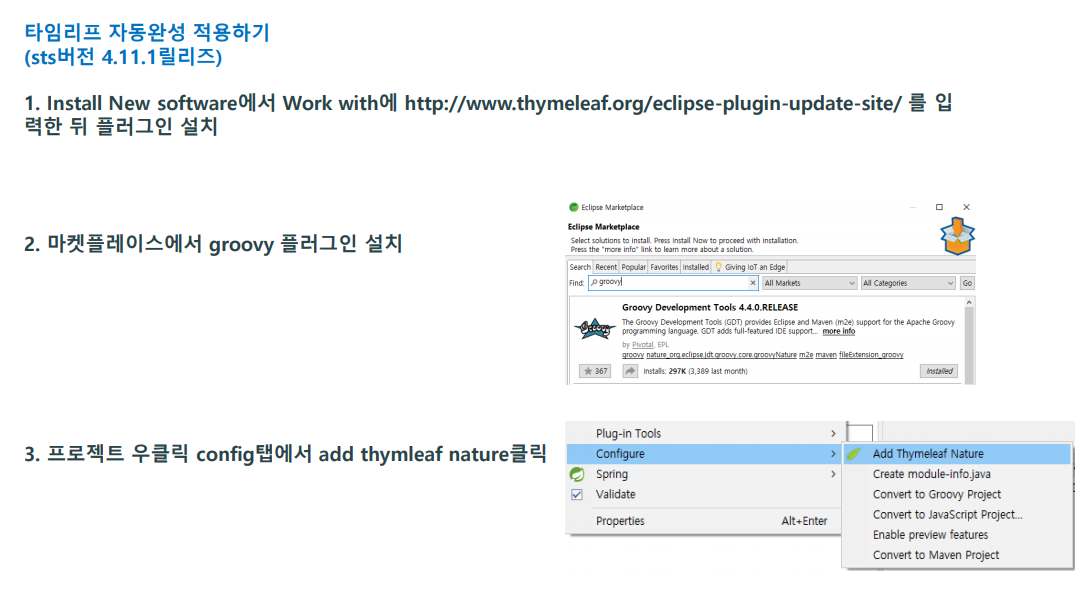
3. 타임리프 문법
https://www.thymeleaf.org/doc/tutorials/3.0/usingthymeleaf.html
Tutorial: Using Thymeleaf
1 Introducing Thymeleaf 1.1 What is Thymeleaf? Thymeleaf is a modern server-side Java template engine for both web and standalone environments, capable of processing HTML, XML, JavaScript, CSS and even plain text. The main goal of Thymeleaf is to provide a
www.thymeleaf.org
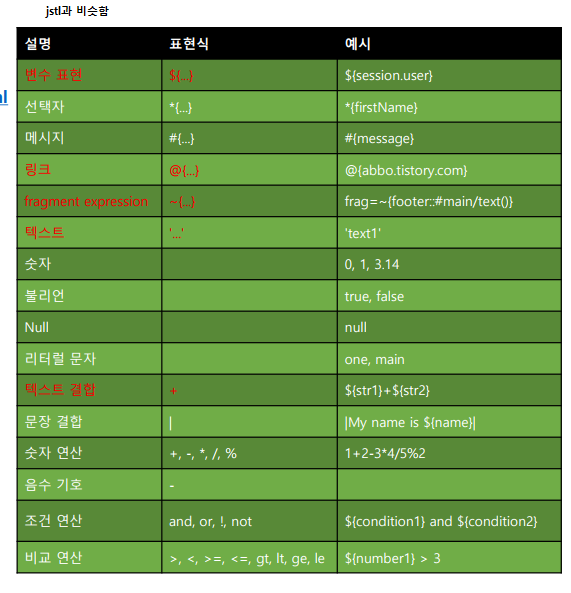
타임리프는 최상단에 xmlns:사용명을 반드시 명시합니다 ( namespace )
명시적으로 타임리프 구문을 사용하겠다. 반드시 달아야하는건 아니지만 th와 같이 이름을 적용해서 사용해도된다.
<html xmlns:th="http://www.thymeleaf.org">
- 변수값 출력 (모델데이터 가져와서 출력하는 부분 중요!!)


<!DOCTYPE html>
<html xmlns:th="http://www.thymeleaf.org">
<head>
<meta charset="UTF-8">
<title>Insert title here</title>
</head>
<body>
	<h3>타임리프 출력과 변수</h3>

	<!-- 타임리프 문법을 사용하려면 속성앞에 th를 붙입니다. -->
	<h3 th:text="${'헬로월드'}"></h3>
	<h3>[[${'헬로월드'}]]</h3>

	<h3 th:text="${1 == 1}"></h3>
	<h3>[[${1 == 1}]]</h3>

	<h3 th:text="${ true and false }"></h3>
	<h3>[[${true and false}]]</h3>

	<h3>[[${'가' eq '가나다'}]]</h3>

	<hr />

	<!-- 변수선언 -->
	<div th:with="a=10">
		[[${a}]]
	</div>

	<div th:with="a='홍길동'" th:text="${a}">

	</div>

	<!-- value속성의 사용 -->
	<div th:with="a = '이순신'">
		<input type="text" th:value="${a}">
	</div>

	<hr />

	<!-- if문 -->
	<div th:with="a=20">
		<span th:if="${a == 10}">[[${a + '입니다.'}]]</span>
		<span th:if="${a == 20}">[[${a + '입니다.'}]]</span>
	</div>

	<!-- if else문 : unless는 동일한 조건을 적습니다. -->
	<div th:with="a=10">
		<span th:if="${a != 10}">10이 아닙니다.</span>
		<span th:unless="${a != 10}">10입니다.</span>
	</div>

	<!-- 삼항연산자 -->
	<div th:with="a=10">
		[[${a == 10 ? '참' : '거짓'}]]<br/>
		[[${a} == 10 ? '참' : '거짓']]
	</div>


</body>
</html>

<!DOCTYPE html>
<html xmlns:th="http://www.thymeleaf.org">
<head>
<meta charset="UTF-8">
<title>Insert title here</title>
</head>
<body>
	<h3>반복문</h3>
	[[${list}]]

	<ul>
		<li th:each="vo:${list}" >
			[[${vo.name}]]
			[[${vo.age}]]
		</li>
	</ul>

	<hr />
	<h3>반복문과 state변수(jstl = varState)</h3>

	<!-- each에 두번쨰 변수를 입력하면 상태값을 담아줍니다. ( index, count, size, current ) -->
	<ul>
		<li th:each="vo, a: ${list}">
			[[${a.count}]]번 - [[${vo.name}]]
		</li>
	</ul>

	<hr />

	<h3>반복문과 조건문</h3>

	<ul>
		<li th:each="vo : ${list}" th:if="${vo.age % 2 == 0}">
			[[${vo.age + '는 짝수입니다.'}]]
		</li>
	</ul>

	<h3>반복문과 조건문2</h3>

	<ul>
		<li th:each="vo : ${list}">
			<span th:if="${vo.age % 2 == 0}">짝수 : [[${vo.age}]]</span>
			<span th:unless="${vo.age % 2 == 0}">홀수 : [[${vo.age}]]</span>
		</li>
	</ul>

</body>
</html>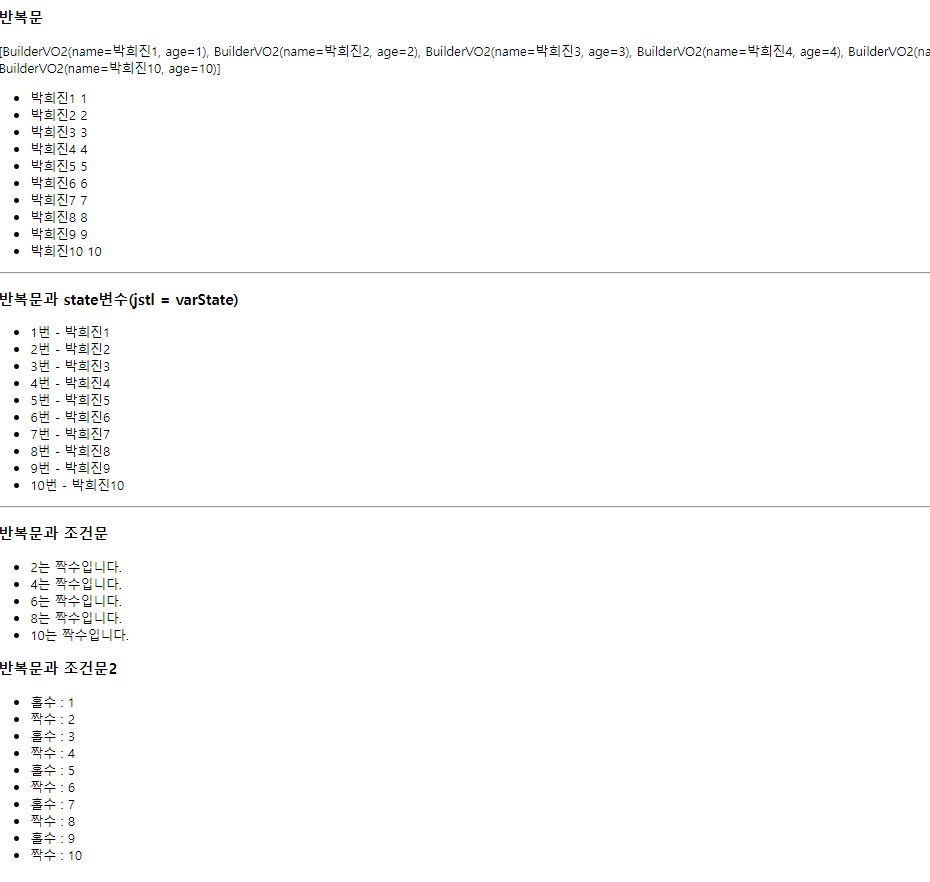


https://developer-rooney.tistory.com/181
[Thymeleaf] 타임리프 a태그 링크 작성 방법
타임리프에서 a태그를 작성할 때는 th:href="@{}" 을 이용하여 작성합니다. 글 상세보기 게시글 리스트 글 상세보기 글 상세보기 글 상세보기
developer-rooney.tistory.com

<!DOCTYPE html>
<html xmlns:th="http://www.thymeleaf.org">
<head>
<meta charset="UTF-8">
<title>Insert title here</title>
</head>
<body>

	<h3>타임리프 block문</h3>

	[[${list}]]
	<hr />

	<ul>
	<!-- 중괄호라고 생각하고 사용하면 된다. -->
		<th:block th:each="vo : ${list}">
			<li>[[${vo}]]</li>
		</th:block>
	</ul>

	<hr />
	<a href="test?a=10">일반 a태그</a>
	<a th:href="@{test?a=10}">타임리프 a태그</a>

	<!-- a링크로 값을 넘기는 방법 -->
	<ul>
		<li th:each="vo : ${list}">

			<!-- 경로(키=값, 키=값)  -->
			<a th:href="@{test(age=${vo.age}, name=${vo.name})}">키값넘기기</a>

			<!-- 경로/변수/변수(키=값, 키=값) -->
			<a th:href="@{test2/{age}/{name}(age=${vo.age}, name=${vo.name})}">키값 넘기기(쿼리파라미터)</a>
		</li>
	</ul>

</body>
</html>
<!DOCTYPE html>
<html xmlns:th="http://www.thymeleaf.org">
<head>
<meta charset="UTF-8">
<title>Insert title here</title>
</head>
<body>
[[${name}]]<br />
[[${vo}]]<br />
<!-- 컨트롤러에서 보내는 값을 JSON문자열 형태로 받아줍니다. -->
<script th:inline="javascript">
var aa = '[[${name}]]';
var bb = '[[${vo}]]';
console.log(bb.name); //undefined
console.log(JSON.parse(aa)); //홍길동
console.log(JSON.parse(bb)); //{name: '빌더홍길동', age: 20}
</script>
</body>
</html>타임리프의 내장함수
타임리프는 Utility Object함수들을 내장으로 가지고 있습니다.
자바의 String 내부에 기본적으로 내장되어 있는 여러 함수라고 생각하면 됩니다.
${#내장함수}
내용이 많아서 잘 정리된 블로그를 첨부합니다 (필요하다면 찾아서 사용)
https://abbo.tistory.com/56
Thymeleaf Utility Objects (1)
Author: 니용 이전 글에서 Thymeleaf의 기본적인 문법을 확인하였다면, 이번 글에서는 Thymeleaf를 더 심도 있게 활용할 수 있는 방법을 알려드리려고 합니다. Thymeleaf는 Utility Object라고 하는 함수를 기
abbo.tistory.com
<!DOCTYPE html>
<html xmlns:th="http://www.thymeleaf.org">
<head>
<meta charset="UTF-8">
<title>Insert title here</title>
</head>
<body>
	<h3>타임리프 내장함수 ( 구글링!! )</h3>

	[[${regdate}]]<br />

	[[${#temporals.format(regdate, 'yyyy-MM-dd')}]]<br />

	[[${#strings.substring('홍길동', 0, 1)}]]
</body>
</html>
//타임리프 내장함수
@GetMapping("/ex05")
public String ex05(Model model) {
//날짜의 형변환은 datebase, 자바, 화면에서 처리
model.addAttribute("regdate", LocalDateTime.now()); //날짜형
return "view/ex05";
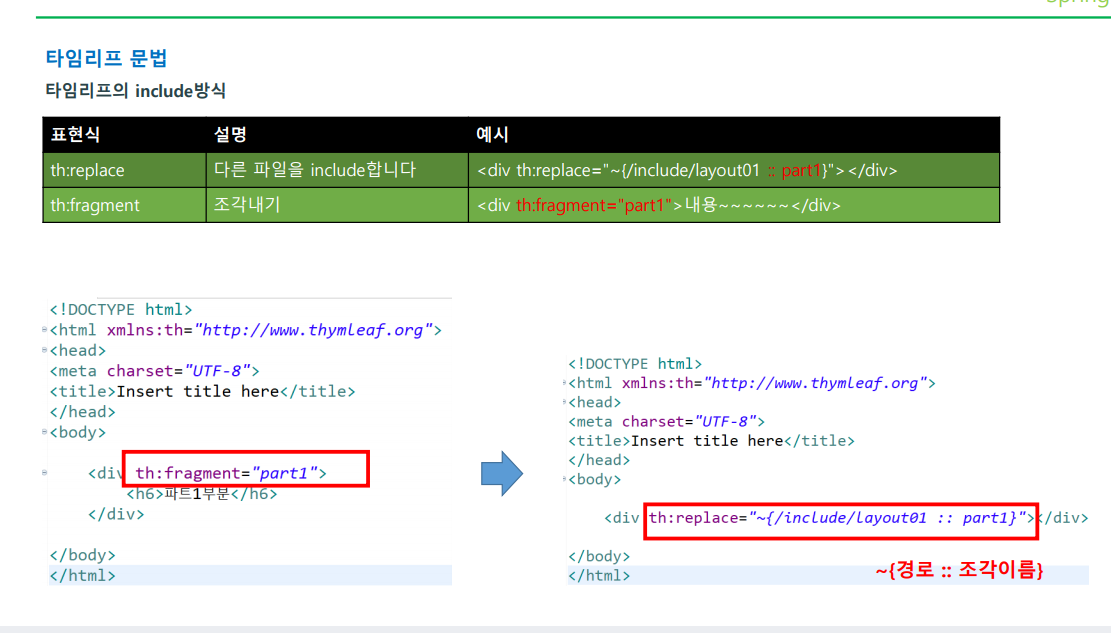
}타임리프의 include 방식
'Spring' 카테고리의 다른 글
| [스프링 부트] 데이터베이스 연결 (2) | 2023.02.14 |
|---|---|
| [스프링 부트] 서버 측 유효성 검사 (0) | 2023.02.14 |
| [스프링부트] 개발환경 구축2 (0) | 2023.02.10 |
| [스프링부트] 개발환경 구축 (0) | 2023.02.09 |
| 템플릿 라이브러리 ( 롬복 ) (2) | 2023.02.07 |