
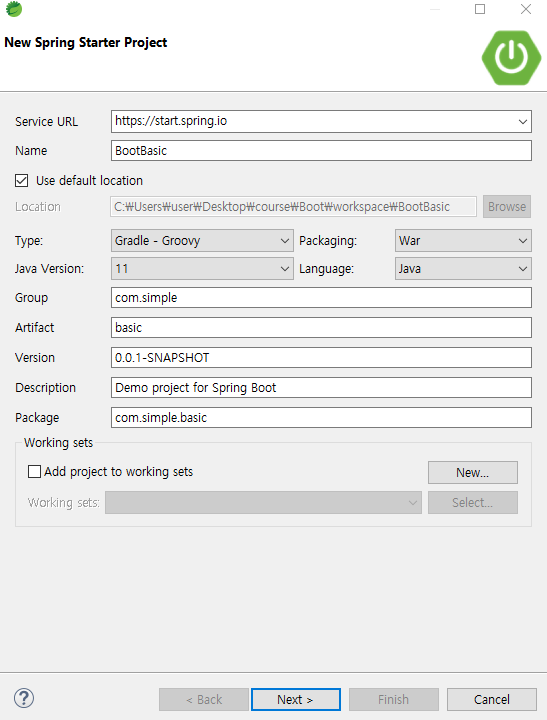


https://mvnrepository.com/artifact/org.springframework.boot/spring-boot-starter-web/2.7.8
필요한 모듈을 버전에 따라 가져와서 사용하는데 모듈 뒤에 버전을 없애면 스프링부트 버전에 자동으로 맞춰진다.
프로젝트 준비 ( 데이터베이스의 선택 )
server.port=8383

####데이터베이스 연결, 커넥션 풀 자동연결####
spring.datasource.driver-class-name=com.mysql.cj.jdbc.Driver
spring.datasource.url=jdbc:mysql://localhost:3306/spring?serverTimezone=Asia/Seoul
spring.datasource.username=spring
spring.datasource.password=spring
프로젝트 준비 ( 뷰의 선택 )
- 타임리프와 jsp의 차이점
- Thymeleaf는 HTML, XML, JavaScript, Css 및 일반 텍스트를 처리 할 수 있는 웹 및 독립형 환경에서 사용할수 있는 Java 템플릿 엔진이다. Thymeleaf는 html파일을 가져와서 파싱해서 분석 후 정해진 위치에 데이터를 치환해서 웹페이지를 생성한다.
- JSP는 서블릿으로 변환되어 실행이 된다. JSP 내에서 자바 코드를 사용할 수도 있다. Thymeleaf는 자바코드를 사용할 수 없고, JSP에서 처럼 컴스텀 태크와 같은 기능도 없다.
1. jsp
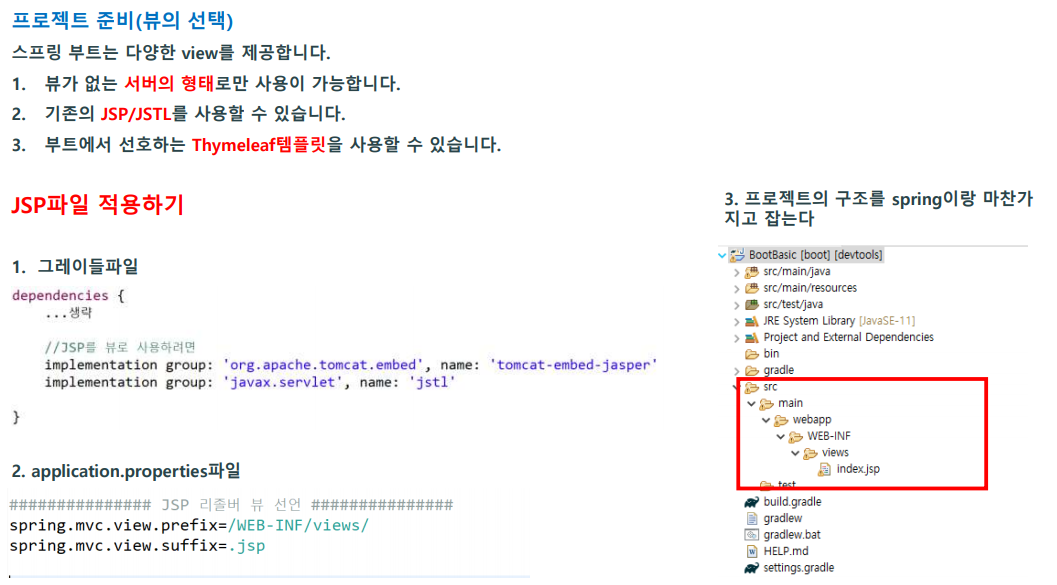
jsp파일 해석기
https://mvnrepository.com/artifact/org.apache.tomcat.embed/tomcat-embed-jasper
jstl
https://mvnrepository.com/artifact/javax.servlet/jstl
2. 타임리프
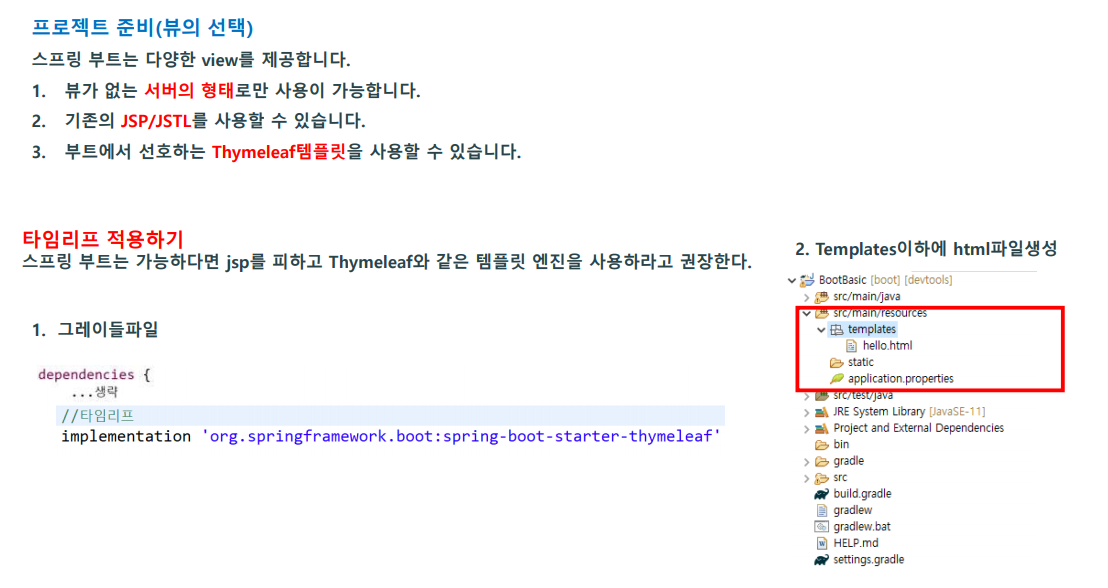
thymeleaf
https://mvnrepository.com/artifact/org.springframework.boot/spring-boot-starter-thymeleaf
스프링 부트에서의 개별적인 bean설정
- 스프링의 동작 방식은 필요한 bean을 IOC컨테이너에 미리 생성하고 꺼내 사용하는 방식입니다.
- 기존 스프링에서 xml로 설정했던 bean은 스프링 부트에서 java로 생성하게 됩니다.
- 웹 설정은 WebMvcConfigurer 인터페이스를 구현합니다

일반적인 자바 파일 예시
package com.simple.basic.config;

public class TestBean {

	public void hello() {
		System.out.println("hello");
	}
}
개별적인 빈 생성 예시
package com.simple.basic.config;

import org.springframework.beans.factory.annotation.Autowired;
import org.springframework.beans.factory.annotation.Value;
import org.springframework.context.ApplicationContext;
import org.springframework.context.annotation.Bean;
import org.springframework.context.annotation.Configuration;
import org.springframework.web.servlet.config.annotation.WebMvcConfigurer;

import com.simple.basic.controller.HomeController;

@Configuration //개별적인 스프링 빈 설정파일
public class WebConfig implements WebMvcConfigurer{

	//IOC컨테이너(스프링 컨테이너)를 직접 볼 수 있는 객체 (빈을 보관하고 있는 장소)
	@Autowired
	ApplicationContext applicationContext;

	//properties파일에 선언된 변수를 바로 참조
	@Value("${server.port}")
	String port;

	@Bean
	public void test() {

		System.out.println("빈 실행1");

		TestBean t = applicationContext.getBean(TestBean.class);
		System.out.println(t);

		HomeController h = applicationContext.getBean(HomeController.class);
		System.out.println(h);

		int c = applicationContext.getBeanDefinitionCount();
		System.out.println("빈의 갯수:" + c);

		System.out.println("properties에 선언된 값:" + port);
	}

	@Bean //해당 메서드 실행하게됨
	public TestBean testBean() {

		System.out.println("빈 실행2");

		//빈으로 등록이 바로 되므로 반환할 때 return값에 클래스나 객체를 생성해두면 빈으로 반환시켜준다,
		//return ...; 빈으로 반환
		return new TestBean(); //빈으로 등록
	}

}
@Configuration을 사용하면
@Bean이 있는 메소드를 여러 번 호출하여도 항상 동일한 객체를 반환하여 싱글톤을 보장한다.


Builder패턴 (디자인패턴)

BuilderVO
package com.simple.basic.command;

public class BuilderVO {

	//빌더 패턴의 모형 - 내부 클래스를 생성하고, 외부에서 호출 시에 내부클래스에 값을 지정
	//장점 - 객체의 불변성 (값의 변경을 막고, 사용시 가독성이 좋다)

	//1. 멤버변수
	private String name;
	private int age;

	//4.VO의 생성자
	private BuilderVO(Builder builder) {
		this.age = builder.age;
		this.name = builder.name;
	}

	//7. 외부에서 객체생성을 요구하면 내부에 있는 Builder클래스를 반환
	public static Builder builder() {

		return new Builder();
	}

	//8.toString 메서드 오버라이딩
	@Override
	public String toString() {
		return "Builder [name=" + name + ", age=" + age + "]";
	}


	//2. 내부클래스 생성 - 클래스 안에 클래스
	public static class Builder{

		private String name;
		private int age;

		//3. 생성자 제한
		private Builder() {}


		//5. 내부 클래스에 setter메서드 생성
		public Builder setName(String name) {
			this.name = name;
			return this;
		}

		public Builder setAge(int age) {
			this.age = age;
			return this;
		}

		//6.build메서드를 생성 - 내부클래스를 외부클래스에 저장하고 반환
		public BuilderVO build() {
			return new BuilderVO(this);
		}
	}


}
빌더패턴 객체의 사용
package com.simple.basic;

import org.junit.jupiter.api.Test;
import org.springframework.beans.factory.annotation.Autowired;
import org.springframework.boot.test.context.SpringBootTest;

import com.simple.basic.command.BuilderVO;
import com.simple.basic.command.BuilderVO.Builder;
import com.simple.basic.controller.HomeController;

@SpringBootTest //스프링부트 테스트 클래스
public class BootTest {

	//빌더패턴 객체의 사용
	@Test
	public void testCode02() {
//		Builder xx = BuilderVO.builder();
//		xx = xx.setAge(10);
//		xx = xx.setName("박희진");
//		BuilderVO vo = xx.build();
//		System.out.println(vo.toString());

		//내부에서 사용할 값을 세팅을 해주는..class안에 class?
		BuilderVO vo = BuilderVO.builder().setAge(10).setName("박희진").build();

		System.out.println(vo.toString());
	}
}
롬복에서 어노테이션으로 쉽게 사용할 수 있다.
package com.simple.basic.command;

import lombok.AllArgsConstructor;
import lombok.Builder;
import lombok.Data;
import lombok.NoArgsConstructor;

@Data
@AllArgsConstructor
@NoArgsConstructor
@Builder // 빌더패턴 ( 필수아님 )
public class BuilderVO2 {

	private String name;
	private int age;

}'Spring' 카테고리의 다른 글
| [스프링 부트] 서버 측 유효성 검사 (0) | 2023.02.14 |
|---|---|
| [스프링 부트] 뷰의 선택 / 타임리프 템플릿 (0) | 2023.02.13 |
| [스프링부트] 개발환경 구축 (0) | 2023.02.09 |
| 템플릿 라이브러리 ( 롬복 ) (2) | 2023.02.07 |
| 템플릿 라이브러리 (타일즈 뷰) (0) | 2023.02.07 |