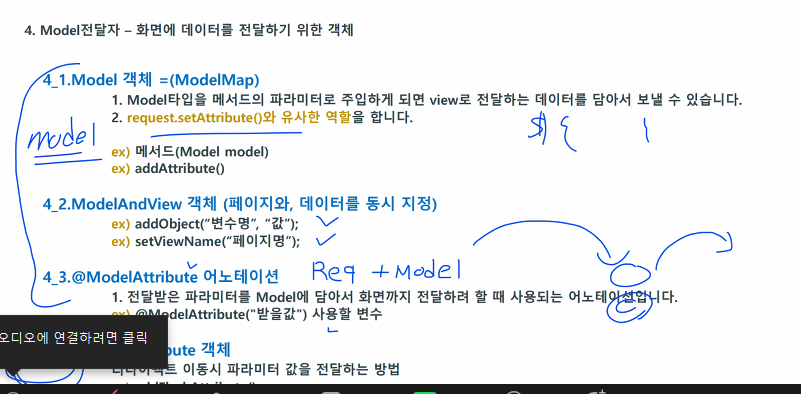
@ModelAttribute 어노테이션
1. 전달받은 파라미터를 Model에 담아서 화면까지 전달하려 할 때 사용되는 어노테이션입니다.
ex) @ModelAttribute("받을값") 사용할 변수
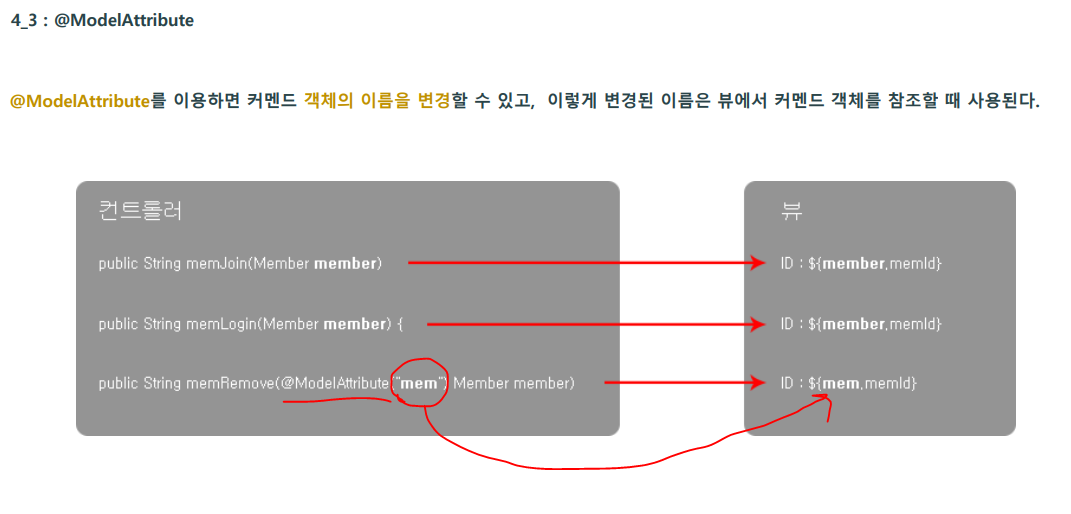
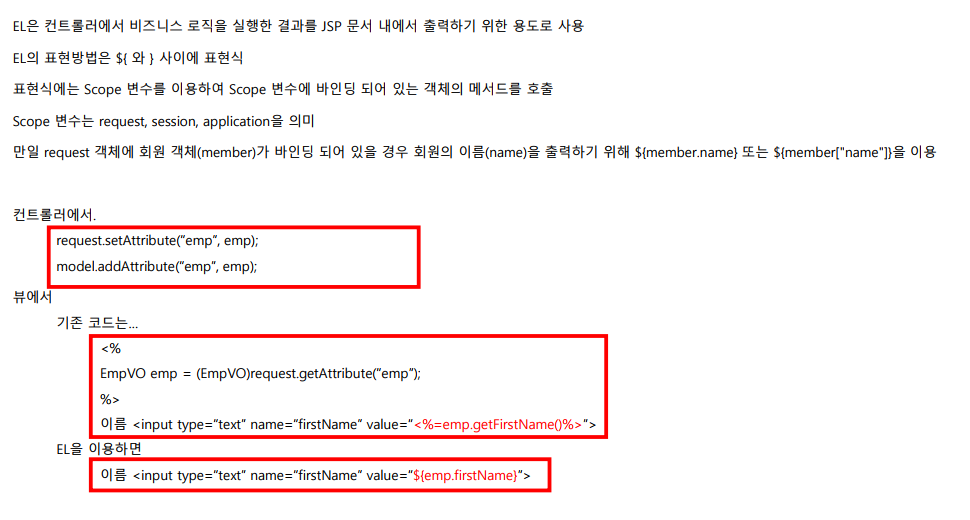
//@ModelAttribute = request + model 위와 똑같음
	@RequestMapping("/result03")
	public String result03(@ModelAttribute("num") String aaa) {
		System.out.println("화면데이터:" + aaa);
		return "response/result03";
	}

	@RequestMapping("/result04")
	public String result04(@ModelAttribute("article") ReqVO vo) {
		System.out.println("화면데이터:" + vo.toString());
		return "response/result04";
	}
RedirectAttribute 객체
리다이렉트 이동시 파라미터 값을 전달하는 방법 (1 회성)
ex) addFlashAttribute()
@RequestMapping("/redirect_login")
	public String loginView() {
		return "response/redirect_login";
	}

	@RequestMapping(value="/login", method=RequestMethod.POST)
	public String Login(@RequestParam("id") String id,
					    @RequestParam("pw") String pw,
					    RedirectAttributes ra) {

		//로그인 성공 -> home 화면으로
		if(id.equals(pw)) {

			ra.addFlashAttribute("msg", "어서와"); //1회성 데이터 session에 저장을 하는 방식 새로고침하면 없어짐

//			return "home";
			return "redirect:/"; //다시 home 컨트롤러를 태워보냄 -model을 사용할 순 없음 /절대경로
		}else {
			ra.addFlashAttribute("msg", "틀렸는데요?ㅋ"); //1회성 데이터 session에 저장을 하는 방식 새로고침하면 없어짐
			return "redirect:/response/redirect_login"; //"redirect:/절대경로"
		}

	}
예제 1)
1-1)
controller
package com.simple.controller;

import org.springframework.stereotype.Controller;
import org.springframework.ui.Model;
import org.springframework.web.bind.annotation.ModelAttribute;
import org.springframework.web.bind.annotation.RequestMapping;
import org.springframework.web.bind.annotation.RequestParam;
import org.springframework.web.servlet.mvc.support.RedirectAttributes;

import com.sample.command.Quiz01VO;
import com.sample.command.Quiz02VO;

@Controller
@RequestMapping("/quiz")
public class QuizController {


	//퀴즈 1번.
	@RequestMapping("/quiz01")
	public void quiz01() {

	}

	@RequestMapping("/sendBirth")
	public String sendBirth(@ModelAttribute("Birth") Quiz01VO vo) {

		String year = vo.getYear();
		String month = vo.getMonth();
		String day = vo.getDay();

		System.out.println(vo.toString());

		return "/quiz/quiz01_ok";
	}

	//퀴즈 2번.
	@RequestMapping("/quiz02")
	public String quiz02() {
		return "/quiz/quiz02";
	}

	@RequestMapping("/join")
	public String join(@ModelAttribute("info") Quiz02VO vo2)
	{
		String id = vo2.getId();
		String pw = vo2.getPw();
		String name = vo2.getName();
		String email = vo2.getEmail();

		return "quiz/quiz02_ok";
	}

	//퀴즈 3번.
	@RequestMapping("/quiz03")
	public void quiz03() {

	}

	@RequestMapping("/join2")
	public String join2(@RequestParam("id") String id,
						@RequestParam("pw") String pw,
						@RequestParam("pw_check") String checkpw,
						RedirectAttributes red,
						Model model)
	{

		if(id.equals("")) {

			red.addFlashAttribute("msg", "아이디를 입력하세요.");

			return "redirect:/quiz/quiz03";
		}else if(!(pw.equals(checkpw)) || pw.equals("")) {

			red.addFlashAttribute("msg", "비밀번호를 확인하세요.");

			return "redirect:/quiz/quiz03";
		}else {

			model.addAttribute("okId", id);

			return "/quiz/quiz03_ok";
		}

	}

}
1-2)
1. QuizController에는 /quiz 폴더 아래의 모든 요청을 처리할 수 있는 컨트롤러를 생성하세요
2. quiz01 화면처리를 할 수 있는 메서드를 생성 (quiz01 맵핑)
3. 다음 생년월일을 받아서 콘솔에 출력하는 메서드를 생성 (sendBirth 맵핑)
조건) Quiz01VO 커맨드객체 사용, 콘솔에 전송된 값을 붙여서 출력합니다 ex)20180615
4. 출력후엔 quiz01_ok 페이지에 "당신의 생일은 ~~~~년 ~~월 ~~일" 을 출력하세요.
quiz01.jsp
<%@ page language="java" contentType="text/html; charset=UTF-8"
    pageEncoding="UTF-8"%>
<%@ taglib uri="http://java.sun.com/jsp/jstl/core" prefix="c" %>
<!DOCTYPE html>
<html>
<head>
<meta charset="UTF-8">
<title>Insert title here</title>
</head>
<body>

	<h2>quiz화면(화면 URL요청: /quiz/quiz01)</h2>
	<form action="sendBirth" method="post">
		생년월일:<br>
		<input type="text" name="year" maxlength="4" size="4" placeholder="년(4자)">
		<select name="month">
			<c:forEach var="i" begin="1" end="12">
				<option>${i }</option>
			</c:forEach>
		</select>
		<input type="text" name="day" maxlength="2" size="4" placeholder="일">

		<input type="submit" value="전송">
	</form>
</body>
</html>
quiz01_ok.jsp
<%@ page language="java" contentType="text/html; charset=UTF-8"
    pageEncoding="UTF-8"%>
<!DOCTYPE html>
<html>
<head>
<meta charset="UTF-8">
<title>Insert title here</title>
</head>
<body>

	당신의 생일은 ${Birth.year }년 ${Birth.month }월 ${Birth.day }일

</body>
</html>
커맨드객체로 정보 보내기 방식을 사용해서 VO클래스 생성
package com.sample.command;

public class Quiz01VO {

	private String year;
	private String month;
	private String day;


	@Override
	public String toString() {
		return year+"0"+month+day;
	}


	public Quiz01VO() {
		super();
	}


	public Quiz01VO(String year, String month, String day) {
		super();
		this.year = year;
		this.month = month;
		this.day = day;
	}


	public String getYear() {
		return year;
	}


	public void setYear(String year) {
		this.year = year;
	}


	public String getMonth() {
		return month;
	}


	public void setMonth(String month) {
		this.month = month;
	}


	public String getDay() {
		return day;
	}


	public void setDay(String day) {
		this.day = day;
	}


}
1-3)
1.QuizController에 화면처리 메서드 생성
2.폼 처리 메서드 생성
3.입력한 정보를 quiz02_ok.jsp 화면에 출력
4.방법 자유
quiz02.jsp
<%@ page language="java" contentType="text/html; charset=UTF-8"
    pageEncoding="UTF-8"%>
<!DOCTYPE html>
<html>
<head>
<meta charset="UTF-8">
<title>Insert title here</title>
</head>
<body>

	<h2>회원가입</h2>
	<form action="join" method="post">
		아이디:<input type="text" name="id"><br>
		비밀번호:<input type="password" name="pw"><br>
		이름:<input type="text" name="name"><br>
		이메일:<input type="email" name="email"><br>
		<input type="submit" value="회원가입">
	</form>


</body>
</html>
quiz02_ok.jsp
<%@ page language="java" contentType="text/html; charset=UTF-8"
    pageEncoding="UTF-8"%>
<!DOCTYPE html>
<html>
<head>
<meta charset="UTF-8">
<title>Insert title here</title>
</head>
<body>
	입력한 회원가입 정보<hr>

 	아이디 : ${info.id }<br>
	비밀번호 : ${info.pw }<br>
	이름 : ${info.name }<br>
	이메일 : ${info.email }
	<br>


</body>
</html>
커맨드객체로 정보 보내기 방식을 사용해서 VO클래스 생성
package com.sample.command;

public class Quiz02VO {

	private String id;
	private String pw;
	private String name;
	private String email;

	public Quiz02VO() {
		super();
	}

	public Quiz02VO(String id, String pw, String name, String email) {
		super();
		this.id = id;
		this.pw = pw;
		this.name = name;
		this.email = email;
	}

	public String getId() {
		return id;
	}

	public void setId(String id) {
		this.id = id;
	}

	public String getPw() {
		return pw;
	}

	public void setPw(String pw) {
		this.pw = pw;
	}

	public String getName() {
		return name;
	}

	public void setName(String name) {
		this.name = name;
	}

	public String getEmail() {
		return email;
	}

	public void setEmail(String email) {
		this.email = email;
	}


}
1-4)
1. quiz03 파일의 화면처리를 할 수 있는 메서드를 생성하세요.
2. 폼태그의 맵핑은 join2 으로 맵핑하세요.
3. 아이디가 적지 않았다면 이라면 quiz03화면으로 이동해서 화면에 "아이디를 입력하세요" 출력
4. 비밀번호와 비밀번호 체크가 다르다면 quiz03화면으로 이동해서 "비밀번호를 확인하세요" 출력
5. 그렇지 않으면 quiz03_ok로 이동해서 "id님 회원가입을 축하합니다" 출력
6. 힌트:문자열 비교는 equals()를 이용, RedirectAttribute 이용
quiz03.jsp
<%@ page language="java" contentType="text/html; charset=UTF-8"
    pageEncoding="UTF-8"%>
<!DOCTYPE html>
<html>
<head>
<meta charset="UTF-8">
<title>Insert title here</title>
</head>
<body>

	<form action="join2" method="post">
		ID: <input type="text" name="id" size="10"><br>
		비밀번호 : <input type="password" name="pw" size="10"><br>
		비밀번호 확인: <input type="password" name="pw_check" size="10"><br>
		<span>${msg }</span>
		<input type="submit" value="로그인">
	</form>

</body>
</html>
quiz03_ok.jsp
<%@ page language="java" contentType="text/html; charset=UTF-8"
    pageEncoding="UTF-8"%>
<!DOCTYPE html>
<html>
<head>
<meta charset="UTF-8">
<title>Insert title here</title>
</head>
<body>
		${okId }님 회원가입을 축하합니다.
</body>
</html>
실습하면서 깨달은점.
RedirectAttributes는 값을 가지고 return할 요청경로로 이동하려면 절대경로를 사용해야한다.
예시로 return "quiz03"; (x) // return "redirect:/quiz/quiz03"; (o)와 같이 절대적인 경로를 사용해야만 요청경로로 이동하게 된다.
RedirectAttributes는 redirect로 리턴하는 코드가 있어야한다.
redirect없이 jsp 페이지를 거쳐갈때는 model로 값을 보내주면 된다.
여기서 requestParam으로 얻은 id값을 가지고 요청경로로 이동할 때 model로 저장해서 가지고 간다. 이유는 리다이렉트 없이 jsp페이지를 거쳐가기 때문이다.
그리고 저장한 키값을 jsp요청페이지에서 ${}로 저장한 값을 사용할 수 있다.
'Spring' 카테고리의 다른 글
| [MySQL] 다운로드 및 사용방법 (0) | 2023.02.02 |
|---|---|
| 스프링 MVC 웹서비스 (0) | 2023.02.02 |
| 스프링 MVC 객체구현 (@Controller) -(2) (0) | 2023.02.01 |
| 스프링 MVC 객체구현 (@Controller) -(1) (2) | 2023.02.01 |
| JSP에 스프링 조립하기 (0) | 2023.01.31 |